Tracearr
Media Monitoring
Monitor media server streams, user activity, and policy violations.
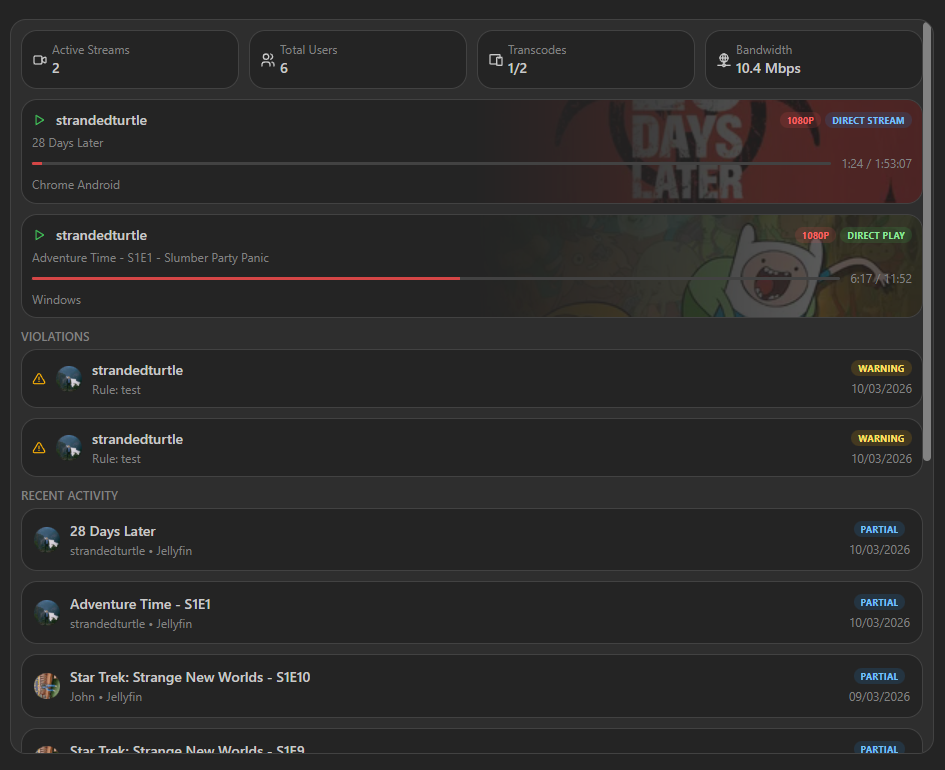
The Tracearr widget provides a real-time monitoring dashboard for your media server activity. It displays active streams, user statistics, recent watching history, and policy violations.
Sections
| Section | Description |
|---|---|
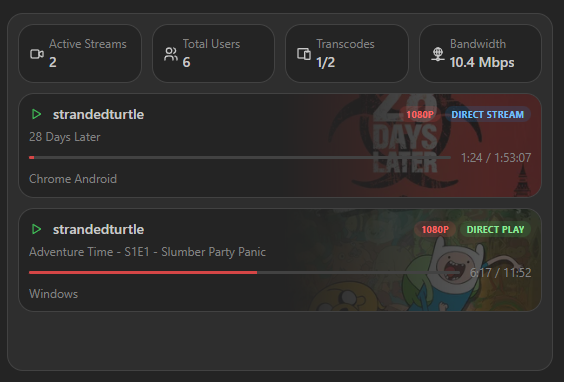
| Stats Bar | Displays Active Streams, Total Users, Transcode Count, and Total Bandwidth at a glance. |
| Active Streams | Shows currently playing media with poster art, user info, progress bar, resolution, and transcoding status (Direct Play or Transcode). |
| Recent Activity | A paginated list of watching history with user avatars and watched status. |
| Violations | Alerts for policy violations (e.g., concurrent stream limits) with severity levels. |
Screenshots
Adding the widget
You can find how to add the widget on the Widgets documentation page.
Supported Integrations

TracearrTracearr is a comprehensive media monitoring solution that tracks streams, user activity, and policy violations in your media server.
Configuration
| Name | Description | Values | Default value |
|---|---|---|---|
| Show Streams | Display the active streams section. | yes / no | yes |
| Show Stats | Display the stats bar with active streams, total users, transcode count, and bandwidth. | yes / no | yes |
| Show Recent Activity | Display the recent activity list with user watch history. | yes / no | yes |
| Show Violations | Display the violations alerts for policy breaches. | yes / no | yes |