Docker stats
Containers
Stats of your containers
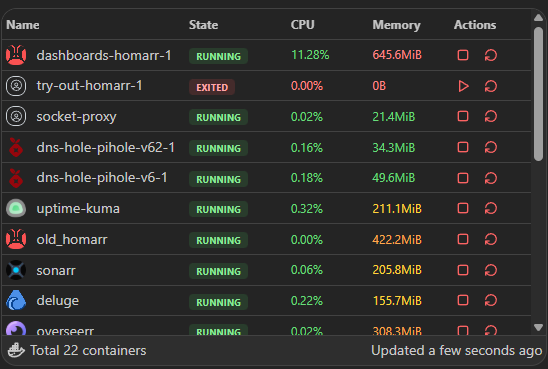
This widget displays the resource usage of your Docker containers and allows you to manage them.
info
This widget can only be used with administrator privileges.
Screenshots
Supported Integrations
DockerDocker is a platform where you can run your applications in containers, allowing for easy deployment and management of applications.
Interactions
Hover a column header to reveal its grab handle, then drag it to reorder the table or drag the header's edge to resize it. The layout is saved automatically for each widget instance and restored after a reload. These controls are disabled while the board is in edit mode.
Each container row has an action menu, accessible via the three-dot icon or by right-clicking the row, with the following options:
- View logs - opens a dedicated terminal page streaming the container's logs
- Start / Stop / Restart - manage the container's state
- Remove - permanently remove the container after a second confirmation click
- Add to Homarr - create a bookmark app from the container
Adding the widget
You can find how to add the widget on the Widgets documentation page.
Configuration
| Name | Description | Values | Default value |
|---|---|---|---|
| Columns to show | Select which columns are visible in the table | Name, State, Host, CPU usage, Memory usage, and Actions | All columns |
| Enable items sorting | Allows to sort containers by clicking on the column headers | yes / no | No |
| Column used for sorting by default | Select which column to use for sorting the containers when the widget is loaded |
| Name |
| Invert sorting | Invert the sorting order (ascending / descending) for the default sorting column | yes / no | No |