Download Client
Torrent clientUsenet clientDownloads
Allows you to view and manage your Downloads from both Torrent and Usenet clients.
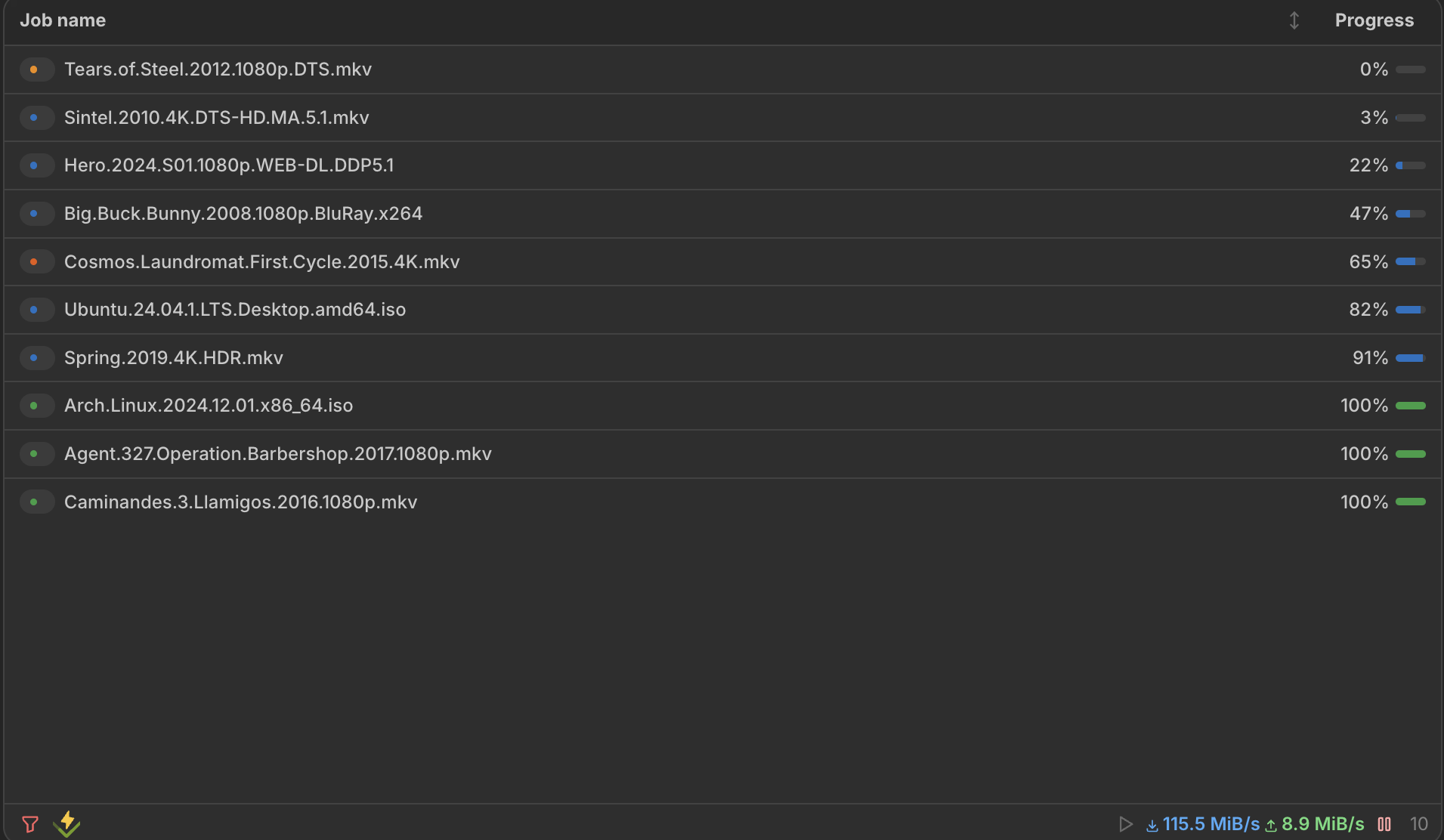
This widget displays a list of torrents or usenet-articles that are currently being downloaded, along with their progress and other relevant information. It supports 7 download client integrations and provides a rich, responsive table interface.
Screenshots
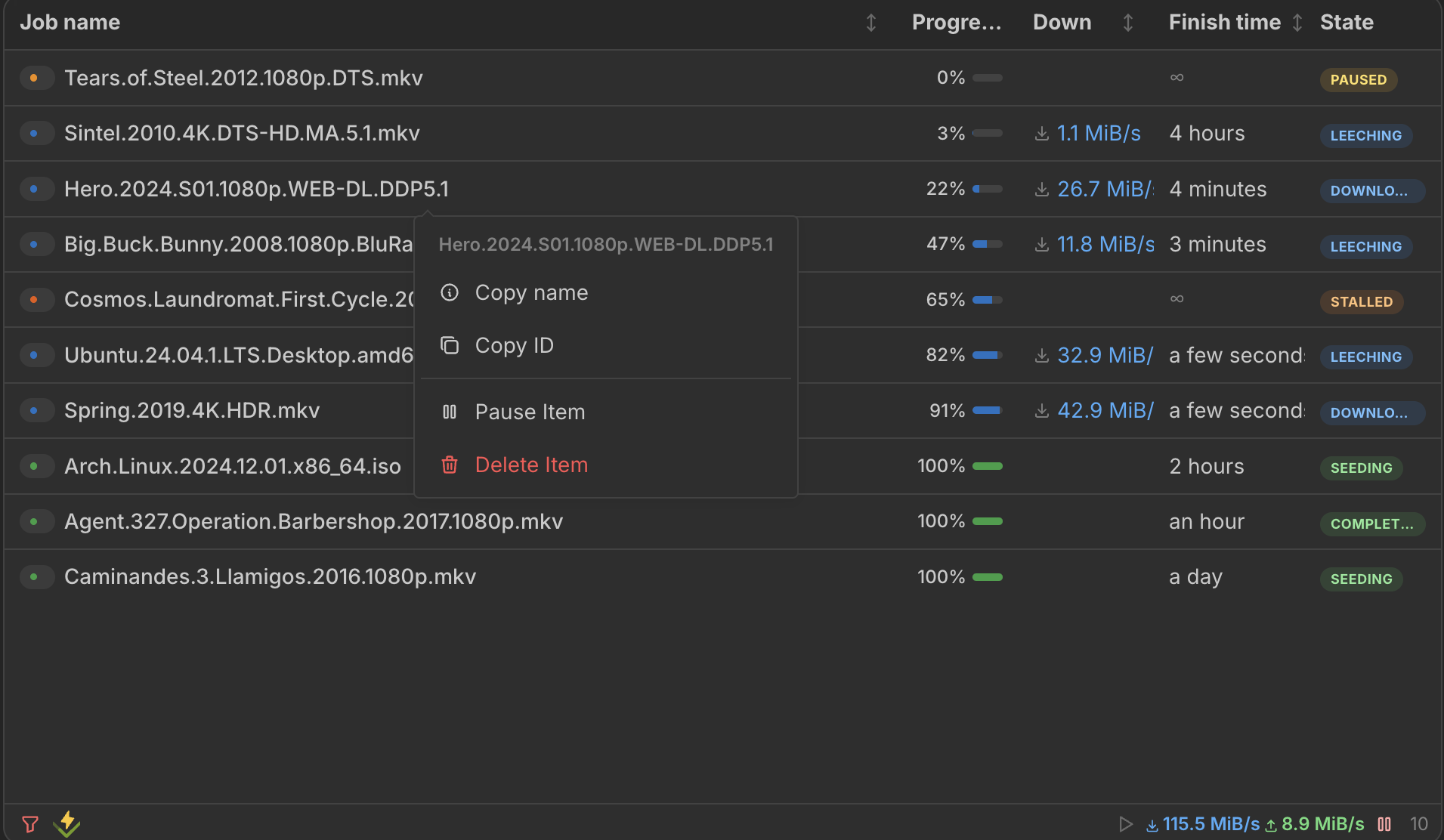
Right-click context menu
Features
- Responsive table — columns automatically adapt to widget width, hiding less important columns at smaller sizes
- Sortable columns — click any column header to sort ascending/descending
- Column customization — choose which columns to display, then hover a header to reveal its grab handle for reordering or drag its edge to resize it; layouts save automatically per widget
- Right-click context menu — pause, resume, delete downloads, or copy download names directly from the context menu
- Row expansion — click any row to see full details inline without opening a separate modal
- Hover tooltips — hover a download name to see size, speeds, ETA, ratio, and category
- Global stats bar — toggle a summary bar showing queue progress, total size, speeds, ratio, and per-state counts
- Client filtering — filter downloads by integration or status using the footer filter panel
- Global controls — pause/resume all downloads across all clients from the footer bar
- Status indicators — color-coded badges show download state at a glance
- Speed overview — total download and upload speeds displayed in the footer
Supported Integrations

SABnzbdSABnzbd is an Open Source Binary Newsreader.Usenet client

NZBGetNZBGet is a lightweight and efficient Usenet downloader.Usenet client

DelugeDeluge is a lightweight, Free Software, cross-platform BitTorrent client.Torrent client

TransmissionA Fast, Easy and Free Bittorrent Client.Torrent client

qBittorrentqBittorrent is a free and open-source BitTorrent client.Torrent client

Aria2Lightweight multi-protocol & multi-source command-line download utility. It supports HTTP/HTTPS, FTP, SFTP, BitTorrent and MetalinkMulti-protocol download client

SlskdA modern client-server application for the Soulseek file sharing network.Soulseek client (read-only)
Interactions
- Right-click any download to open a context menu with pause/resume, delete, and copy actions
- Click any row to expand it and see full download details inline
- Hover a download name for a quick stats tooltip
- Stats toggle — show or hide the global stats bar from the footer
- Pause / Resume all downloads using the footer controls
- Filter by integration or status using the filter button in the footer
- Sort by clicking column headers (with persistent sort direction)
Adding the widget
You can find how to add the widget on the Widgets documentation page.
Configuration
| Name | Description | Values | Default value |
|---|---|---|---|
| Columns to show | Select the columns you want to display in the widget. Columns automatically hide/show based on widget width. | List of columns: name, progress, size, downSpeed, upSpeed, time, state, added, ratio, received, sent, category, integration, index, type | name, progress, downSpeed, time, state |
| Default sort column | The column used for initial sorting when the widget loads. | List of columns: name, progress, size, downSpeed, upSpeed, time, added, ratio, received, sent, index, type | progress |
| Invert sorting | This will invert the default sorting order. | yes / no | no |
| Show usenet entries marked as completed | This will show entries that have been completed in your Usenet client. | yes / no | yes |
| Show torrent entries marked as completed | This will show entries that have been completed in your Torrent client. | yes / no | yes |
| Show Miscellaneous entries marked as completed | This will show entries that have been completed in your Miscellaneous client. | yes / no | yes |
| Hide completed torrent under this threshold (in kiB/s) | This will hide completed torrent entries that have a download speed below the specified threshold. | Any number above 0, 0 to disable | 0 |
| Categories/labels to filter | You can filter the items by categories or labels. Use a comma to separate multiple values. | Comma-separated list of categories or labels | - |
| Filter as a whitelist | If enabled, only items that match the filter will be shown. If disabled, items that do not match the filter will be hidden. | yes / no | no |
| Use filter to calculate Ratio | This will use the category filter when calculating the global torrent ratio. | yes / no | yes |
| Limit items per integration | This will limit the number of items shown per integration, not globally. | Any number above 1 | 50 |