Media Request List
Media requests
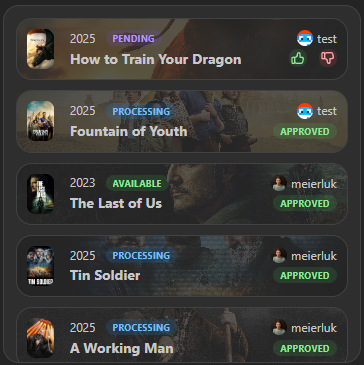
See a list of all media requests from your integration
Provides a list of all open and recently closed requests. It also provides the functionality to approve or reject requests.
You can limit the list to specific request statuses (for example, only show pending) and restrict it to requests created within the last N days.
Screenshots
Supported Integrations


Interactions
- Approve / decline a request by clicking on the thumbs up or down icon.
- Hover over the widget to reveal a search button that opens Spotlight in media request search mode, scoped to the widget's integrations.
Adding the widget
You can find how to add the widget on the Widgets documentation page.
Configuration
| Name | Description | Values | Default value |
|---|---|---|---|
| Open links in new tab | If enabled, links will open in a new tab. | yes / no | yes |
| Statuses to show | Only requests with these statuses will be shown. Defaults to all statuses. | List of: 'pending', 'approved', 'declined', 'failed', 'completed' | All statuses |
| Show only recent requests | Limit to requests created within this many days. Set to 0 to disable the time filter. | 0-365 | 0 |